I hope to release some more code to the sourceforge site as soon I have made some decent progress.
Showing posts with label Software. Show all posts
Showing posts with label Software. Show all posts
Tuesday, 26 May 2009
Flex Viewer Development Moving Again
I am restarting development on the Flex viewer system for conquest server. I have decided to focus my efforts on CR viewing for now. I am going to try and get this functioning as a complete tool for viewing images outside the department for non-diagnostic means.

Friday, 6 March 2009
PACS and Hyper-V Server Virtualization?
Hyper-V is the Microsoft Server Virtualization product that comes standard with Windows 2008 Server. (There are a couple of other virtualization products, but Hyper-V is free with Windows 2008 server) I went to a presentation recently explaining Hyper-V, among other things. I have always though that server virtualization may be a good idea for a PACS implementation, but until recently I hadn't really given it too much thought.
Server virtualization basically means that you create 1 or more virtual servers on a physical server. i.e. There is some software that does some fancy magic to make it possible to install multiple operating systems on your computer as though they are a complete system on its own.
The major benefit of server virtualization that I can see is the fact that the server itself is in effect a file now when it is Virtual. You can take a snapshot of the server and copy it off to a new location. In the event of a massive failure, all you need to do is copy the file back and you will have you server running as it was when you took the snapshot!
This is obviously fantastic if you consider that you can make backups of your entire server with the click of a button just before a software upgrade and then test to see how it goes. If you are feeling really clever you can even take the snapshot of your server and re-boot it on another computer and test the software upgrade away from the live environment!
Another fantastic feature of server virtualisation is that you can run almost any operating system as a virtual server! So you can have one Windows 2008 Box that has Windows 2003, Windows 2000 and even a flavour of linux running on it all at the same time!
Virtual machines can also be migrated to new hardware much more easily as the snapshot of the server can be coppied to a new higher spec machine, more resource allocated to it and then turn it on and BAM! Server upgraded!
The downside to virtualization technology is that if you have one physical server running several virtual machines, then if you loose the one physical server due to hardware failure, you loose all the virtual servers running on that hardware.
You can setup some advanced configurations that will automatically fail-over to another server, but eventually you need to consider your risk appetite and your budget.
But I think virtualization is definetly something to look at if you are getting a new PACS system.
Monday, 5 January 2009
Google Chrome on Linux
I thought I would give Google Chrome a go on Ubuntu Linux. This is what happened ...
Google Chromium is the open source project for Google Chrome. You can find it here: http://code.google.com/p/chromium

There are build instructions on the following page for Ubuntu: http://code.google.com/p/chromium/wiki/LinuxBuildInstructions
I thought this was taking too long so I Googled around a bit and found the following link that has a link to download a .deb file:
http://www.ubuntugeek.com/how-to-install-chromium-google-chrome-in-ubuntu-using-deb-package.html
http://www.codeweavers.com/services/ports/chromium/
This download is only about 34MB in total and seemed a lot easier than compiling from source.


I got it up and running, but I must admit it is not very stable. I managed to crash it several times in the first couple of minutes!
I also found it to be incredibly slow on my Virtual Machine, it was actually almost impossible to use, but it may be better on a dedicated computer.
Hopefully an official release is available soon, but until then give it a try.
Thursday, 27 November 2008
Basic Network Skills
It seems to me that there are a large amount of medical equipment technical people out there with little or no networking skills. I come from an IT background so I often battle to understand how some people can be so silly when it comes to certain things.
For instance we have been having problems with our one CT scanner sending images through to our Conquest archive. Eventually we managed to get the technician on site and go into thier settings. It turns out they set the defualt gateway incorrectly. It is such a basic thing, but many people out there actually don't know what a default gateway does!
With this in mind I have compiled a list of links that I think are manditory for anyone who wishes to setup or troubleshoot network connections:
7 Layers of the OSI model
The 7 Layers of the OSI model define the basic levels of network communication. It is critical for a technician to have an understanding of the various layers of the OSI model and understand how information traverses these layers.
For instance DICOM is a layer 7 protocol that will have to traverse all the other layers for a connection to be estabished. This will mean that layer 1 - 7 all need to be operational before any images can be sent.
Command Line
The command line is a network admininstrators greatest friend! You can do a massive amount of troubleshooting and diagnostic work from command line. Here are a couple of basic commands to get you started:
ping
this command is used to test basic end to end connectivity. If you can ping a device then there is network connectivity between the two. If you cannot ping a device then you know that something is going wrong between the two computers.
Usage: ping [-t] [-a] [-n count] [-l size] [-f] [-i TTL] [-v TOS]
[-r count] [-s count] [[-j host-list] | [-k host-list]]
[-w timeout] [-R] [-S srcaddr] [-4] [-6] target_name
Options:
-t Ping the specified host until stopped.
To see statistics and continue - type Control-Break;
To stop - type Control-C.
-a Resolve addresses to hostnames.
-n count Number of echo requests to send.
-l size Send buffer size.
-f Set Don't Fragment flag in packet (IPv4-only).
-i TTL Time To Live.
-v TOS Type Of Service (IPv4-only).
-r count Record route for count hops (IPv4-only).
-s count Timestamp for count hops (IPv4-only).
-j host-list Loose source route along host-list (IPv4-only).
-k host-list Strict source route along host-list (IPv4-only).
-w timeout Timeout in milliseconds to wait for each reply.
-R Use routing header to test reverse route also (IPv6-only).
-S srcaddr Source address to use.
-4 Force using IPv4.
-6 Force using IPv6.
tracert
This command shows you the route a packet takes to get to its destination. Tracert is critical when you need to know if there are any routing problems on the network.
Usage: tracert [-d] [-h maximum_hops] [-j host-list] [-w timeout]
[-R] [-S srcaddr] [-4] [-6] target_name
Options:
-d Do not resolve addresses to hostnames.
-h maximum_hops Maximum number of hops to search for target.
-j host-list Loose source route along host-list (IPv4-only).
-w timeout Wait timeout milliseconds for each reply.
-R Trace round-trip path (IPv6-only).
-S srcaddr Source address to use (IPv6-only).
-4 Force using IPv4.
-6 Force using IPv6.
arp
ARP stands for address resolution protocol. You can use this command to get the mac address of a computer on the local network. Please note that if you use this command to try get the mac address of a computer that is not on the same subnet as you the command will return the local interface mac address of your router.
Displays and modifies the IP-to-Physical address translation tables used by
address resolution protocol (ARP).
ARP -s inet_addr eth_addr [if_addr]
ARP -d inet_addr [if_addr]
ARP -a [inet_addr] [-N if_addr] [-v]
-a Displays current ARP entries by interrogating the current
protocol data. If inet_addr is specified, the IP and Physical
addresses for only the specified computer are displayed. If
more than one network interface uses ARP, entries for each ARP
table are displayed.
-g Same as -a.
-v Displays current ARP entries in verbose mode. All invalid
entries and entries on the loop-back interface will be shown.
inet_addr Specifies an internet address.
-N if_addr Displays the ARP entries for the network interface specified
by if_addr.
-d Deletes the host specified by inet_addr. inet_addr may be
wildcarded with * to delete all hosts.
-s Adds the host and associates the Internet address inet_addr
with the Physical address eth_addr. The Physical address is
given as 6 hexadecimal bytes separated by hyphens. The entry
is permanent.
eth_addr Specifies a physical address.
if_addr If present, this specifies the Internet address of the
interface whose address translation table should be modified.
If not present, the first applicable interface will be used.
Example:
> arp -s 157.55.85.212 00-aa-00-62-c6-09 .... Adds a static entry.
> arp -a .... Displays the arp table.
IPConfig
This tool allows you to see all the networking information about your computer.
The most common usages of this command are:
ipconfig /all - this will give you all the information about your networking connections.
ipconfig /flushdns - This flushes the DNS cache. (i.e. clears your DNS tables)
ipconfig /renew - this gets a new DHCP address
USAGE:
ipconfig [/allcompartments] [/? | /all |
/renew [adapter] | /release [adapter] |
/renew6 [adapter] | /release6 [adapter] |
/flushdns | /displaydns | /registerdns |
/showclassid adapter |
/setclassid adapter [classid] ]
where
adapter Connection name
(wildcard characters * and ? allowed, see examples)
Options:
/? Display this help message
/all Display full configuration information.
/allcompartments Display information for all compartments.
/release Release the IPv4 address for the specified adapter.
/release6 Release the IPv6 address for the specified adapter.
/renew Renew the IPv4 address for the specified adapter.
/renew6 Renew the IPv6 address for the specified adapter.
/flushdns Purges the DNS Resolver cache.
/registerdns Refreshes all DHCP leases and re-registers DNS names
/displaydns Display the contents of the DNS Resolver Cache.
/showclassid Displays all the dhcp class IDs allowed for adapter.
/setclassid Modifies the dhcp class id.
The default is to display only the IP address, subnet mask and
default gateway for each adapter bound to TCP/IP.
For Release and Renew, if no adapter name is specified, then the IP address
leases for all adapters bound to TCP/IP will be released or renewed.
For Setclassid, if no ClassId is specified, then the ClassId is removed.
Examples:
> ipconfig ... Show information
> ipconfig /all ... Show detailed information
> ipconfig /renew ... renew all adapters
> ipconfig /renew EL* ... renew any connection that has its
name starting with EL
> ipconfig /release *Con* ... release all matching connections,
eg. "Local Area Connection 1" or
"Local Area Connection 2"
> ipconfig /allcompartments ... Show information about all
compartments
> ipconfig /allcompartments /all ... Show detailed information about all
compartments
Other Tools
There are a host of networking related tools on the internet. Here are a list of the ones that I use on a daily basis.
Superscan
Superscan is a port scanning program. It basically finds all the computers in a specific ip range. I find this too usefull when I need to find a computer on the network or when I need to find computers running specific services on the network.
I prefer version 3.0. The latest version irritates me a bit.
Ping a ding ding
This is a very basic tool that pings an IP address and makes a noise when it can or cannot see the remote device. I find this very useful when a machine has lost connectivity and I need to know as soon as it is available again.
UltaVNC
UltraVNC remote admin tool that allows you to take over the remote computer.
The Dude
I have written about the dude before. This is an awsome application for monitoring your network infrastructure. We use it to monitor all of our core networking devices and some of our servers including the serivces on those servers i.e. DICOM services.
Monday, 10 November 2008
Conquest Dicom Flex Web Viewer Screenshots
As promissed here are some screenshots of the Conquest Flex Webviewer system that I am working on at the moment. Please note that this system is still a work in progress and is not yet ready for release.

This is the main worklist interface which initially displays the studies for the current day.

This is the main viewer interface.

The screenshot above shows an image that could not be converted.

Above is the log screen that shows viewer events such as image conversion errors.
K-PACS v1.6 Released
I haven't been onto the k-pacs.de website in a while, but this morning I went back to be greated by a new version of thier application, K-PACS 1.6.

The system seems pretty much the same as version 1.5, but I have not had a chance yet to look at it too closely. Hopefully I can give a full review in the next couple of days.
I did notice a new disclaimer though, see screenshot below:
Wednesday, 3 September 2008
New Browser - Google Chrome

Google released a new browser into the wild yesterday. The new browser called Google Chrome has many cool features and I think it has the potential to become a major player in the heavily contested browser market.
The new browser sports a whole bunch of features never before seen in the browser world as well as some of the same old standard things we have come to expect from a modern browser such as tabbed browsing.
As Google tends to do, they thought about stuff a lot more and came up with some really nice solutions to some age old problems.
Lets look at some of the cool new features I think will make this browser take the browser market to new levels:
Tabbed browsing processes
Tabbed browsing has become a standard feature since it was introduced a couple of years back.
The thing is google looked at the tabs and said mmm, lets take this and make it work better. They took the tabs and instead of running them as seperate threads under the same process they decided to split each tab into its own process. The benefit of this accoring to thier website is that it allows for better garbage collection which prevent the browser from using up all the computers resources after it has been open for some time. This will also allow you to end only the tab that causes the problems, not the entire browser itself. This is a major step forward in thinking and I think it will be a matter of time before all the bigger players in the browser market follow suite.
Internal Process Monitoring

Google Chrome comes with its own task manager that allows you to check which tabs and plugins are causing hassels and kill them if they are getting out of hand.
There is also a link in the bottom called stats for nerds which gives you more detail on the tasks.
Advanced URL Bar
Much like the Mozilla Firefox 3 URL bar the Google Chrome address bar gives you rich results based on not only the URL entered but based on the title of the page. In addition to this the Google Chrome address bar also uses google suggest to find search results in the address bar and you can use the address bar to search.
Google has used all of its considerable resources for page rank and other technologies to add assitave technology that is seemless, quick and pretty into this seeming simple portion of the web browser.
User Interface
Of all the browsers that I am awareof on the market today, Google Chrome is the most simple and clean in terms of UI. They have followed thier concepts from thier Google search page and made a very simple, fast and very powerfull system that is easy for anyone to use without much knowledge. Don't be fooled though because behind all the simplicity there are appear to be some awsome tools for the tech savvy nerds.
I have only spent about 1 hour with this browser, but I think this may be the browser of the future! I will keep you posted on any new features that I find.
Get Google Chrome here: http://www.google.com/chrome
Friday, 18 July 2008
View Dicom files in Windows Explorer
 MicroDicom Shell Extension allows you to view thumbnails of Dicom images in Windows explorer just like any other picture. It is a very nice neat application that seems to work pretty well.
I tested it on my Windows Vista Business SP1 machine and it worked well, even with JPEG Lossless encoded Dicom images.
I think this application could be useful to help find DICOM images on your computer.
Tuesday, 17 June 2008
Its Firefox Download Day!
 | Today is the day Mozilla Firefox is going to attempt to make a world record for the most downloads of an application in 24 hours. |
"Download Day starts at 10:00 a.m. Pacific Daylight Time on Tuesday, June 17th."http://twitter.com/mozillafirefox
To check your local time check http://tinyurl.com/4e7fv5
Join in on the world record!

Thursday, 29 May 2008
Mozilla Guinness World Record Attempt

Join in the fun and be apart of the Guinness World Record attempt for the most downloads in 24 hours by downloading Mozilla Firefox 3 when it is released some time this June. You can go to the following page and pledge to download Firefox. This will also allow you to sign-up for the email alert which will alert you to the release of Firefox 3.
Thursday, 22 May 2008
Conquest Server Digging in the Bin

I found an interesting quirk of Conquest Dicom server today while doing some house keeping. I deleted some images in the image directory and decided to re-initialise the database. I suddely noticed that Conquest was shuffeling through the recycle bin and pulling out all the images I had just deleted! (See image)
This seems to happen when you have the data directory (MAGDevice0=D:\) of Conquest Dicom Server set as the root of a drive. (In this instance D:\) to rectify the problem I created a new folder called DICOMDATA and pointed conquest to that directory to store its images. (MAGDevice0=D:\DICOMDATA\)
I would reccomend that you do not use the root of a disk as the place to store your Dicom images. Rather create a seperate folder in that directory for image storage. I have not verified that this happens on all operating systems yet, but the system I am testing this on is Windows Vista Business Edition 64bit, with MySQL as a DB Server.
Tuesday, 22 April 2008
ClearCanvas Workstation 1.1
ClearCanvas Workstation 1.1 has been released. It has some handy new features which I found quite useful. Now remember I am not a radiologist so I can't comment on all the image manipulation functionality, but I will try and get some feedback from one of our radiologists as soon as I can.
From my point of view I think the new version of the workstation brings some awesome new tools to the table. For one the ability to have reference lines in studies is a huge improvement and one that I know some of our radiologists require as a standard feature.
List of new features in ClearCanvas Workstation 1.1:

Some of the tools available (Elliptical ROI, Protractor)

Spacial Locator

Reference Lines
On the whole I would like to congratulate the ClearCanvas developers for their outstanding work. I think they are going to have an amazing application. The workstation is currently on a par with others such as K-PACS (Or even better), but I think with the rapid development cycle that we have seen so far as well as the availability of the source and an SDK this workstation will very soon be able to compete with the likes of Osirix. I hope to see some 3D capabilities in the future from this exciting project. Keep up the good work guys!
From my point of view I think the new version of the workstation brings some awesome new tools to the table. For one the ability to have reference lines in studies is a huge improvement and one that I know some of our radiologists require as a standard feature.
List of new features in ClearCanvas Workstation 1.1:
- Reference lines
- Synchronized stacking
- Spatial locator
- Elliptical ROI
- Protractor
- Multiframe image support

Some of the tools available (Elliptical ROI, Protractor)

Spacial Locator

Reference Lines
On the whole I would like to congratulate the ClearCanvas developers for their outstanding work. I think they are going to have an amazing application. The workstation is currently on a par with others such as K-PACS (Or even better), but I think with the rapid development cycle that we have seen so far as well as the availability of the source and an SDK this workstation will very soon be able to compete with the likes of Osirix. I hope to see some 3D capabilities in the future from this exciting project. Keep up the good work guys!
Thursday, 10 April 2008
Conquest Server and 2.8TB RAID - The Battle!
Its been some time and we have had many hiccups with our new Conquest Dicom server.
First of all we battled to get 4 x 1TB drives as they seemed to be rare in our part of the world.
We then had some issues as one of the disks failed due to the case being too cramped and hot, so we got a bigger more spacious and cooler case to house the hard drives.
Then we had a problem with Windows Vista not picking up the entire RAID array. It seems as though Windows Vista Business Edition 32bit can only install itself on a partition that is more than 3TB. So then we installed a smaller 160GB disk to run the operating system.
The next problem is that Windows Vista can now recognise the whole RAID array, but it automatically partitions it into a 2TB partition and a 700GB partition. You cannot make the whole disk one partition!
So my current plan now is to retain my old conquest server that is running out of space, install Ubuntu Linux on the 2.8TB drive machine and share the disk. Then mount the disk as a network drive on the original conquest Dicom server and see if that allows us to have the full 2.8TB drive space available for Dicom images.
Some of the other things I thought of doing where the following:
The major benefit of this setup is that we are utilising an Open Source OS and therefore we can save some money instead of forking out for Windows. I also think that by using a network share as the primary storage for the Conquest Dicom server we will be able to more easily swap out storage servers in the future by merely adding a new mapping to another server, etc.
Lets hope that Ubuntu does the trick! I am installing it as we speak. (Hold thumbs that the RAID configuration works!)
PS: Raid Calculatator: http://www.ibeast.com/content/tools/RaidCalc/RaidCalc.asp
4 x 931GB HDD in RAID 5 Array = 2.793TB
First of all we battled to get 4 x 1TB drives as they seemed to be rare in our part of the world.
We then had some issues as one of the disks failed due to the case being too cramped and hot, so we got a bigger more spacious and cooler case to house the hard drives.
Then we had a problem with Windows Vista not picking up the entire RAID array. It seems as though Windows Vista Business Edition 32bit can only install itself on a partition that is more than 3TB. So then we installed a smaller 160GB disk to run the operating system.
The next problem is that Windows Vista can now recognise the whole RAID array, but it automatically partitions it into a 2TB partition and a 700GB partition. You cannot make the whole disk one partition!
So my current plan now is to retain my old conquest server that is running out of space, install Ubuntu Linux on the 2.8TB drive machine and share the disk. Then mount the disk as a network drive on the original conquest Dicom server and see if that allows us to have the full 2.8TB drive space available for Dicom images.
Some of the other things I thought of doing where the following:
- Setting up multiple smaller conquest servers for each modality.
- Setting up multiple instances of conquest server on a single machine and depending on the AE Title sending the data to different partitions on the disk.
- Using Windows Vista Business Edition 64bit
The major benefit of this setup is that we are utilising an Open Source OS and therefore we can save some money instead of forking out for Windows. I also think that by using a network share as the primary storage for the Conquest Dicom server we will be able to more easily swap out storage servers in the future by merely adding a new mapping to another server, etc.
Lets hope that Ubuntu does the trick! I am installing it as we speak. (Hold thumbs that the RAID configuration works!)
PS: Raid Calculatator: http://www.ibeast.com/content/tools/RaidCalc/RaidCalc.asp
4 x 931GB HDD in RAID 5 Array = 2.793TB
Monday, 31 March 2008
UltraVNC on Windows Vista
There seem to be a couple of issues with UltraVNC and Windows Vista.
I am currently setting up a Conquest Dicom Server on Windows Vista Business Edition.
I want to use UltraVNC to remotely manage the server.
The problem is that with MySQL I need to disable UAC (User Account Control) which then causes UltaVNC to stop functioning.
Also you can not send the Ctrl. + Alt. + Del. command to Windows Vista with UltraVNC.
I found this article which seems to have the solution.
http://www.uvnc.com/vista/
I am currently setting up a Conquest Dicom Server on Windows Vista Business Edition.
I want to use UltraVNC to remotely manage the server.
The problem is that with MySQL I need to disable UAC (User Account Control) which then causes UltaVNC to stop functioning.
Also you can not send the Ctrl. + Alt. + Del. command to Windows Vista with UltraVNC.
I found this article which seems to have the solution.
http://www.uvnc.com/vista/
Thursday, 6 March 2008
Internet Explorer 8 Beta 1


Microsoft has released Internet Explorer 8 Beta 1 for public download. You can get it here.
There seem to be some cool new features as shown on thier website.
Some of the features that I like are:
Domain Name Highlighting in the Address bar
The address bar highlights the name of the domain. For instance in the screenshot below you can easily see that you are on www.google.com.

Activities

There are some easy to use activities added to the right click context menu that allows you to share information via many media like facebook, etc. You can add on more activities from Microsofts website.
It is still early days for IE8, I would not suggest using it as your default browser as I have already noticed that it does not display some pages correctly. It is however a fun application to download and play with to see where IE is going in the future.
It is still early days for IE8, I would not suggest using it as your default browser as I have already noticed that it does not display some pages correctly. It is however a fun application to download and play with to see where IE is going in the future.
Tuesday, 4 March 2008
ClearCanvas Workstation 1.0

Well ClearCanvas Workstation is no longer a beta. I downloaded version 1.0. And I must say I am pretty impressed! They seem to have sorted out a lot of the speed issues I mentioned in my previous entry.
The system is still a little bit rough around the edges, but I expect that the ClearCanvas developers will polish out these in no time.
Some of the things that got to me a bit where:
- You first have to download an image from the a DICOM server and then find it in your local queue before you can view it. It would be better if you could just click view and the system woul download and then display the image.
- You cannot seem to access a Conquest server that is running the dbaseIII driver.
- There is no option to mark studies status, i.e. read, viewed, etc.
- It is a lot faster than the beta version I tried initially.
- I have not managed to crash it just yet. I can crash any application :)
- It works fine on Windows Vista.
- The Subset of tools seems pretty good.
- Nice and basic to setup and use.
IQ-DICOMTest V2.7

I found IQ-DICOMTest today. Its a nice util for testing dicom associations, etc.
"iQ-DICOMTEST represents a set of tools for the purpose of testing and troubleshooting DICOM communications." Image Information Systems Ltd.You can get your copy of this software from the Image information systems website. You will have to create an account on thier forum (But I am sure you already have if you have downloaded K-PACS).
Click here to get your copy of IQ-DICOMTest.
Friday, 29 February 2008
Using Mikrotik's The Dude to Monitor Dicom Modalities

The Dude from Mikrotik is a wonderful network administrator tool for monitoring almost anything to do with your network.
I was first introduced to it a few months back when we implemented a wireless wide area network in preparation for PACS. Since then The Dude has become an indispensable tool in my everyday work life.
The Dude is capable of many things, but my favorite features are:
- Continuous Pings to check if devices are active
- Service checking (i.e. http, ftp, etc.)
- Link monitoring (The dude shows live network link usage!)
- Graphing
- Active alerting via email, pop-up, etc.
- Server setup (I have setup The Dude on a central server and connect to it from the console only. This assists in monitoring the system even when my laptop is shutdown)
Step 1: Create New Network Map
I created a new network map so that my views are not too cluttered. I have one for my WAN view and I created a new one for DICOM modalities.
You can create a new map by double clicking on the "network maps" link in the menu tree and then clicking on the + icon.
Step 2: Add DICOM modality
I then added a dicom modality to the system. The machine I chose is a Conquest Dicom Server I have setup at one of my remote sites. To add the modality you can open up the network map and press the + and select device.
You can then type in the IP Address of the modality.
Step 3: Setup Ping Monitoring
You should now see the device in the network map.
You can now right click on it and select the services tab.
Click on the + button and select ping.
You can also add a notification on the notification tab.
You can setup the notification types in the notification link in the menu tree.
I setup a notification that emails myself and the other IT admins.
Step 4: Setup DICOM service monitoring
To add a service monitor for the DICOM service you need to do the following:
Open the settings tab for the device and go to services.
Click on the pus button, then click on the small ... icon on the right hand side of the probe drop-down list.
Click on the + button and give the new service a name like "conquest dicom".
Select "TCP" for the type and then in the Port section put in the DICOM port for your modality.
I then selected the connect only option.
Once this is done you can setup email notifications, etc. So that if the DICOM service goes down on your conquest server you will be notified by email.


Conclusion
The Dude is very useful for monitoring both your standard network infrastructure as well as your dicom modalities. I find it very useful to have as it notifies the instant there is a problem though-out the entire network. In fact I normally know there is a problem with a server or a network link before my users. I would recommend that if you have a lot of devices to monitor that you give Mikrotiks The Dude a try.
Monday, 7 January 2008
Conquest Dicom Server 1.4.13
http://www.image-systems.biz/phpBB2/viewtopic.php?t=1074&sid=88158b00f1c81bf1210f64b676be5cb3
Version 1.4.13 of Conquest server was released on Friday.
Upgrading on Windows:
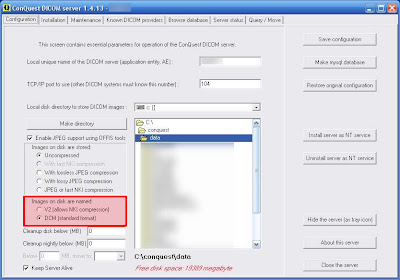 There is a nice new little feature in the GUI interface that allows for the images to be stored as standard DCM as apposed to the V2 file format.
Additional scripting options have also been added, I will report on these as soon as I have had some time to test them all out.
Version 1.4.13 of Conquest server was released on Friday.
Upgrading on Windows:
- Download the latest files from http://www.xs4all.nl/~ingenium/dicom.html
- Stop the conquest service if it is installed and close the conquest server gui interface.
- extract the files in the directory you installed conquest
- let all files and folders get overwritten
- re-start the conquest server service or open the gui interface.
 There is a nice new little feature in the GUI interface that allows for the images to be stored as standard DCM as apposed to the V2 file format.
Additional scripting options have also been added, I will report on these as soon as I have had some time to test them all out.
K-PACS v1.5
K-PACS version 1.5 has been released recently. It has some interesting improvements.
The new features include the following:
1.) Patient Level View
You can now view all the patients in a single pane as opposed to only having a study level view. This feature works both on the local database as well as on remote databases.
2.) Preview Thumbnails for local studies
The system now shows you a preview thumb of the series in the study. This feature however only appears to work on the local image database and not on remote studies.

3.) Built-in Burn to Disc Feature
K-Pacs now comes with its very own built in CD-Burning utility. It appears to work very well and even includes its own DICOM viewer.
4.) Status Icons
There are now status icons in the bottom right hand side of the K-PACS window which indicate available disk space on the workstation and also the status of the K-PACS server itself.
5.) Measuring and Annotations
Some new measuring and annotations have been added to the system as well.
I think this is a good step forward for K-PACS, but there is still quite a long way for them to go before they can compete with the likes of Osirix.
You can get your copy of K-PACS from www.k-pacs.net
The new features include the following:

1.) Patient Level View
You can now view all the patients in a single pane as opposed to only having a study level view. This feature works both on the local database as well as on remote databases.
2.) Preview Thumbnails for local studies
The system now shows you a preview thumb of the series in the study. This feature however only appears to work on the local image database and not on remote studies.

3.) Built-in Burn to Disc Feature

K-Pacs now comes with its very own built in CD-Burning utility. It appears to work very well and even includes its own DICOM viewer.
I Did not manage to get the software to recognise the CD/DVD RW Drive of my Dell Latitude D820. So I created a CD project and burnt the files to a disc manually with the bundled software.Edit: Got the CD Burning feature to work after a re-boot. It works like a dream.
4.) Status Icons
There are now status icons in the bottom right hand side of the K-PACS window which indicate available disk space on the workstation and also the status of the K-PACS server itself.
5.) Measuring and Annotations
Some new measuring and annotations have been added to the system as well.
I think this is a good step forward for K-PACS, but there is still quite a long way for them to go before they can compete with the likes of Osirix.
You can get your copy of K-PACS from www.k-pacs.net
Subscribe to:
Posts (Atom)