I hope to release some more code to the sourceforge site as soon I have made some decent progress.
Showing posts with label Conquest. Show all posts
Showing posts with label Conquest. Show all posts
Tuesday, 26 May 2009
Flex Viewer Development Moving Again
I am restarting development on the Flex viewer system for conquest server. I have decided to focus my efforts on CR viewing for now. I am going to try and get this functioning as a complete tool for viewing images outside the department for non-diagnostic means.

Friday, 9 January 2009
Conquest & Philips MRI 3T Troubles
Our Philips 3T MRI is giving us problems when archiving to one of our Conquest servers. It seems like the Radiographers workstation sends images in MRIImageStorageEnhaced (1.2.840.10008.5.1.4.1.1.4.1 - MR) and GrayscaleSoftcopyPresentationStateStorage (1.2.840.10008.5.1.4.1.1.11.1 - PR) format to the archive.
The Philips ViewForum, GE Centricity, K-PACS and ClearCanvas workstations that we use can not retrieve these images sent to the archive from this modality.
After doing a little bit of digging and some Googling I found that I am not the only one with this problem.
- http://www.iq-view.com/forum/viewtopic.php?f=33&t=607
- http://www.image-systems.biz/forum/viewtopic.php?f=33&t=1434&p=4315
As per the advice in these forum posts I removed the following (By putting a # in front of them.) from the dgatesop.lst file:
- MRImageStorageEnhanced 1.2.840.10008.5.1.4.1.1.4.1 sop
- GrayscaleSoftcopyPresentationStateStorage 1.2.840.10008.5.1.4.1.1.11.1 sop
This seems to have solved the problem of new images received by the server as it changes their SOPClassUI to MRStorage 1.2.840.10008.5.1.4.1.1.4
However all existing images on the server with the SOP classes that where disabled above are now not visible to the workstations.
The same modality sends images to our old Conquest archive in the same format and everything works fine. The two Conquest servers configurations are almost identical, they are both running 1.4.14, with jpeg lossless compression enabled.
I also noticed in the logs on both servers that there where multiple entries stating:
*** Association rejected: you may need to add the listed presentation context as sop to dgatesop.lst
I have also noticed that there is a difference in the dgatesop.lst files:

As you can see in the screenshot above, I used notepad++ to compare the files and found that the server giving the problems has LittleEndianExplicit disabled.
I re-enabled this and it still had little effect.
I have posted on the Conquest Server forum and hope that Marcel can come to my rescue again, because I am sitting with about 300-400 patients that can not be accessed!
Monday, 10 November 2008
Conquest Dicom Flex Web Viewer Screenshots
As promissed here are some screenshots of the Conquest Flex Webviewer system that I am working on at the moment. Please note that this system is still a work in progress and is not yet ready for release.

This is the main worklist interface which initially displays the studies for the current day.

This is the main viewer interface.

The screenshot above shows an image that could not be converted.

Above is the log screen that shows viewer events such as image conversion errors.
Monday, 3 November 2008
Conquest Web Viewer 2.0
I have recently found out about something called Adobe Flex. Flex is a programming language that allows you to make Adobe Flash applications. I did some experimentation and found that you can do a couple of cool things with it like pull information in from PHP, dynamically load images and manipulate the images.
So being the experimental type I have started writing a new web viewer system that plugs into Conquest Dicom Server. The system is a small scale PACS web viewer system.
Basically how it works:
The system is still a work in progress as I am slowly learning the ins and outs of a new programming language and then still doing all the rest of my work which basically sees me bouncing back and forth between C#, PHP, Flex and Javascipt. Its enough to get anyones head in a spin as all these languages have slightly different syntaxes.
Anyways I expect that I should have a working prototype ready for upload onto sourceforge some time before the end of the year so keep your eyes open. I think this system is gonna be way better than my last attempt.
If anyone is interested in getting into Adobe Flex here are some links:
So being the experimental type I have started writing a new web viewer system that plugs into Conquest Dicom Server. The system is a small scale PACS web viewer system.
Basically how it works:
- Flex application calls back end PHP scripts which connect to the database to show a work list.
- The Flex application calls a PHP script which converts images to JPG files which are then loaded into the Flex application.
- The Flex program then has some functions for basic things like brightness, contrast, flip, rotate and cine.
The system is still a work in progress as I am slowly learning the ins and outs of a new programming language and then still doing all the rest of my work which basically sees me bouncing back and forth between C#, PHP, Flex and Javascipt. Its enough to get anyones head in a spin as all these languages have slightly different syntaxes.
Anyways I expect that I should have a working prototype ready for upload onto sourceforge some time before the end of the year so keep your eyes open. I think this system is gonna be way better than my last attempt.
If anyone is interested in getting into Adobe Flex here are some links:
- Flash Develop (Opensource Flex IDE) - http://www.flashdevelop.org/community/viewforum.php?f=11
- Adobe Flex Opensource SDK - http://www.adobe.com/products/flex/flexdownloads/index.html
- Adobe Flex 3 Developer Guide - http://livedocs.adobe.com/flex/3/html/help.html?content=Part2_DevApps_1.html
Thursday, 9 October 2008
10 TB Conquest Server
Finally our new Dell Server arrived! It has been quite a mission to set the whole thing up. All I can say is that there wher tons of boxes and lots of manuals to go through, but it was worth it. The Dell server and rack are amazing! Everything snaps into place and looks so neat and tidy. (Compared to our other cheap cabinets).
We have the following system now:
Dell PowerEdge 2950
- Windows 2008 Server x64
- 2 x 2GHz Quad Core Xeon, 4GB RAM
- 6 Disks in RAID 5 for OS and DB
Dell PowerVualt MD3000
- 15 x 1TB SATA HDD (RAID5 2x hot spares)
- 10TB Usable Space
- 2 x SAS Connectors
The Windows 2008 Server system seems to have taken the Conquest installation quite well. I have had no hicups yet. The software installed for was the following:
- Conquest Server 1.4.14 - Dicom Server
- WAMP server 2.0c - Database and Web Server
- MySQL GUI Tools - Database Management
- UltraVNC 1.0.4 RC17 - Remote access
- Conquest Webview A1 - Dicom Web Viewer
I have only encountered one setup issue at the moment and that is regarding the Windows 2008 and Dell Storage management software. It seems as though once again Windows will only recognise a certain amount of hard disk space for a single partition. The magic number in Windows 2008 64bit seems to be roughly 2TB. So I have had to make 6 partitions for the Dicom Data. I am a bit concerned how Conquest is going to handle this as I have never played with the MAGDevices functionality, but accoring to their forum it should work.
Partitioning the disks and spanning the dicom data across multiple partitions is probably going to break the Conquest Web Viewer system as it can only look in one folder for images. I will have to take a look at this and make some modifications to the code to make it function better. I am also experimenting with ZIP functinoality allowing users to download a zip file containing all the DICOM images in a series to thier local machine via the web viewer interface.
I will post some more information once I have the system is live.
Thursday, 4 September 2008
Conquest 1.4.14 released
The newwest version of Conquest Dicom Server has been released. (Version 1.4.14)
From Conquest Website:
"New features: improved web pages and scripting, bug fixes; flexible import/export converters; Number of Study Related Instance queryable etc. [Version 1.4.13: SqLite driver, jpeg and mysql driver in one package, auto setup database, delayed forwarders and prefetchers, more scripting commands, WEB viewer for IE, configure V2/DCM, configuration of deletion order, bug fixes. [Version 1.4.12c: Bug fixes, import converter, converter scripting, extensions to flexible filenamesyntax], [Version 1.4.12: better database performance, better control of forwarding, important bug fixes], [Version 1.4.11: K-Pacs viewer, native MySql driver, worklist fix, virtualserver fix, flexible filenamesyntax, WEBReadOnly, Fix forwarder retry logic], [version 1.4.10: Virtual server, Optional more debug info], [version 149a: GUI crash fix], [version 149: Modality Worklist, Linux and Web interface (fixes), faster retrieve, fixes in delete and nightly move, retry failed forwards, more JPEG fixes, built-in JPEG/RLE decompressor, downsize compressor, AE with ~xx sets compression, split/merge series, multiple UID query]"
http://www.xs4all.nl/~ingenium/dicom.htmlI will install and have a review ready as soon as time permits. In the meantime download and play!
Friday, 30 May 2008
The regen Marathon
 Well it has been more than 24 hours and Conquest is still going through all the Dicom files in the data directory and re-generating the image database! The MySQL server is showing that there are over 3 Million rows in the images table so far! (See screenshot)
I must say I never thought that it would take this long to search through all the images. (1.8 TB worth). I just hope and pray that our other archive which has 2.8TB of storage never goes through the same process!
Thursday, 29 May 2008
Conquest Server Fix


We had a problem with one of our Conquest Dicom servers. The problem seemed to stem from Windows causing some file corruption. The servers disk was extreamly full, because we had not setup the cleanup disk functionality. At the end of the day the disk was un-bootable and we where sitting with 1.8TB of CT, Mammo and MRI scans on this RAID array.
I installed another 40GB HDD in the machine and installed Windows XP on it. When trying to open the 1.8TB RAID disk in Windows Explorer I recieved an error. To fix this I ran CHKDSK and waited. Check disk took some time, but managed to repair the file tree and the disk information was visible once again.
I am now in the process of doing a single device regen. This process seems to be taking a very long time, but the nice thing now is that the new installation of conquest I am using with MySQL. I prefer using mysql becuase of the GUI tools that come with it. As you can see from the screenshot I can monitor the health of the system and I have been watching how mysql is performing about 30 SQL queries a second!
From this experience I would recomend to anyone out there to make sure that they install thier operating system on a physically seperate disk from thier DICOM data. An aditional 40-80GB hard drive is not a major cost, but it can save you some major headaches in future.
Thursday, 22 May 2008
Conquest Server Digging in the Bin

I found an interesting quirk of Conquest Dicom server today while doing some house keeping. I deleted some images in the image directory and decided to re-initialise the database. I suddely noticed that Conquest was shuffeling through the recycle bin and pulling out all the images I had just deleted! (See image)
This seems to happen when you have the data directory (MAGDevice0=D:\) of Conquest Dicom Server set as the root of a drive. (In this instance D:\) to rectify the problem I created a new folder called DICOMDATA and pointed conquest to that directory to store its images. (MAGDevice0=D:\DICOMDATA\)
I would reccomend that you do not use the root of a disk as the place to store your Dicom images. Rather create a seperate folder in that directory for image storage. I have not verified that this happens on all operating systems yet, but the system I am testing this on is Windows Vista Business Edition 64bit, with MySQL as a DB Server.
Tuesday, 22 April 2008
Conquest Dicom Server on Windows Vista 64bit
OK after a huge battle, we finally have our 2.8TB disk installed and running. Just to let you know all the various options that we tried check this list out:
System Configuration:
System Configuration:
- 4 x 1TB Hard Disk Drives in RAID5 Array (2.8TB) for DICOM data
- 1 x 180GB Hard Drive for operating system an applications
- Windows XP - XP Can't see a partition bigger than 1.8 TB
- Windows Vista 32bit - Vista 32bit automatically partitions the drive into 2 partions. There is no option to make a single large partition greater than about 2TB.
- Ubuntu Linux - I could not get the tools on Ubuntu to recognise the RAID array correctly. It could only get it to see about 700GB. If the disk was working I was going to use samba to share the disk and mount it as a network drive on the existing server.
- Windows Vista 64bit - Works like a dream.
Thursday, 10 April 2008
Conquest Server and 2.8TB RAID - The Battle!
Its been some time and we have had many hiccups with our new Conquest Dicom server.
First of all we battled to get 4 x 1TB drives as they seemed to be rare in our part of the world.
We then had some issues as one of the disks failed due to the case being too cramped and hot, so we got a bigger more spacious and cooler case to house the hard drives.
Then we had a problem with Windows Vista not picking up the entire RAID array. It seems as though Windows Vista Business Edition 32bit can only install itself on a partition that is more than 3TB. So then we installed a smaller 160GB disk to run the operating system.
The next problem is that Windows Vista can now recognise the whole RAID array, but it automatically partitions it into a 2TB partition and a 700GB partition. You cannot make the whole disk one partition!
So my current plan now is to retain my old conquest server that is running out of space, install Ubuntu Linux on the 2.8TB drive machine and share the disk. Then mount the disk as a network drive on the original conquest Dicom server and see if that allows us to have the full 2.8TB drive space available for Dicom images.
Some of the other things I thought of doing where the following:
The major benefit of this setup is that we are utilising an Open Source OS and therefore we can save some money instead of forking out for Windows. I also think that by using a network share as the primary storage for the Conquest Dicom server we will be able to more easily swap out storage servers in the future by merely adding a new mapping to another server, etc.
Lets hope that Ubuntu does the trick! I am installing it as we speak. (Hold thumbs that the RAID configuration works!)
PS: Raid Calculatator: http://www.ibeast.com/content/tools/RaidCalc/RaidCalc.asp
4 x 931GB HDD in RAID 5 Array = 2.793TB
First of all we battled to get 4 x 1TB drives as they seemed to be rare in our part of the world.
We then had some issues as one of the disks failed due to the case being too cramped and hot, so we got a bigger more spacious and cooler case to house the hard drives.
Then we had a problem with Windows Vista not picking up the entire RAID array. It seems as though Windows Vista Business Edition 32bit can only install itself on a partition that is more than 3TB. So then we installed a smaller 160GB disk to run the operating system.
The next problem is that Windows Vista can now recognise the whole RAID array, but it automatically partitions it into a 2TB partition and a 700GB partition. You cannot make the whole disk one partition!
So my current plan now is to retain my old conquest server that is running out of space, install Ubuntu Linux on the 2.8TB drive machine and share the disk. Then mount the disk as a network drive on the original conquest Dicom server and see if that allows us to have the full 2.8TB drive space available for Dicom images.
Some of the other things I thought of doing where the following:
- Setting up multiple smaller conquest servers for each modality.
- Setting up multiple instances of conquest server on a single machine and depending on the AE Title sending the data to different partitions on the disk.
- Using Windows Vista Business Edition 64bit
The major benefit of this setup is that we are utilising an Open Source OS and therefore we can save some money instead of forking out for Windows. I also think that by using a network share as the primary storage for the Conquest Dicom server we will be able to more easily swap out storage servers in the future by merely adding a new mapping to another server, etc.
Lets hope that Ubuntu does the trick! I am installing it as we speak. (Hold thumbs that the RAID configuration works!)
PS: Raid Calculatator: http://www.ibeast.com/content/tools/RaidCalc/RaidCalc.asp
4 x 931GB HDD in RAID 5 Array = 2.793TB
Friday, 29 February 2008
Using Mikrotik's The Dude to Monitor Dicom Modalities

The Dude from Mikrotik is a wonderful network administrator tool for monitoring almost anything to do with your network.
I was first introduced to it a few months back when we implemented a wireless wide area network in preparation for PACS. Since then The Dude has become an indispensable tool in my everyday work life.
The Dude is capable of many things, but my favorite features are:
- Continuous Pings to check if devices are active
- Service checking (i.e. http, ftp, etc.)
- Link monitoring (The dude shows live network link usage!)
- Graphing
- Active alerting via email, pop-up, etc.
- Server setup (I have setup The Dude on a central server and connect to it from the console only. This assists in monitoring the system even when my laptop is shutdown)
Step 1: Create New Network Map
I created a new network map so that my views are not too cluttered. I have one for my WAN view and I created a new one for DICOM modalities.
You can create a new map by double clicking on the "network maps" link in the menu tree and then clicking on the + icon.
Step 2: Add DICOM modality
I then added a dicom modality to the system. The machine I chose is a Conquest Dicom Server I have setup at one of my remote sites. To add the modality you can open up the network map and press the + and select device.
You can then type in the IP Address of the modality.
Step 3: Setup Ping Monitoring
You should now see the device in the network map.
You can now right click on it and select the services tab.
Click on the + button and select ping.
You can also add a notification on the notification tab.
You can setup the notification types in the notification link in the menu tree.
I setup a notification that emails myself and the other IT admins.
Step 4: Setup DICOM service monitoring
To add a service monitor for the DICOM service you need to do the following:
Open the settings tab for the device and go to services.
Click on the pus button, then click on the small ... icon on the right hand side of the probe drop-down list.
Click on the + button and give the new service a name like "conquest dicom".
Select "TCP" for the type and then in the Port section put in the DICOM port for your modality.
I then selected the connect only option.
Once this is done you can setup email notifications, etc. So that if the DICOM service goes down on your conquest server you will be notified by email.


Conclusion
The Dude is very useful for monitoring both your standard network infrastructure as well as your dicom modalities. I find it very useful to have as it notifies the instant there is a problem though-out the entire network. In fact I normally know there is a problem with a server or a network link before my users. I would recommend that if you have a lot of devices to monitor that you give Mikrotiks The Dude a try.
Friday, 8 February 2008
Getting Conquest Dicom Server to run on Windows Vista with MySQL
This is a brief tutorial on setting up Conquest Dicom Server on Windows Vista Business Edition (32bit) using MySQL Community edition.
Why use Conquest on Vista?
Windows XP has a limitation that only allows the operating system to recognize partions up to around 2 Terabytes. With Windows Vista you can have much larger partitions allowing your Conquest server to store way more data. I am currently testing with a machine that has 4 x 1 TB disks in a RAID 5 array which will result in a partition size of 3 TB.
Installing MySQL 5.1 Community Edition on Windows Vista Business Edition
I could not get the current stable release of MySQL 5.0 to install correctly on Windows Vista.
I kept getting an error when running the configuration utility that said something about "side-by-side" configuration being incorrect. Even with the user account management turned off.
I have found that the Release candidate version of MySQL (5.1.22-RC) installs fine on Windows Vista. You just need to turn off the User Account
Start -> Control Panel -> User Accounts -> User Accounts -> Turn User Account Control on or off.
Uncheck the box and restart Windows
.
Now you can install MySQL on your computer by following the wizard.
You can download MySQL 5.1.22 RC 2 from this link.
http://dev.mysql.com/downloads/mysql/5.1.html
I would also suggest that you download the MySQL GUI tools for easy administration of your MySQL database server.
http://dev.mysql.com/downloads/gui-tools/5.0.html
Installing Conquest Dicom Server on Windows Vista Business Edition
Once you have installed MySQL Server 5.1.22 RC you can start the Conquest Dicom server installation.
The standard conquest installation procedure will get you through the rest of the installation.
And just so that you know I also managed to get K-PACS 1.5 running very nicely on Vista without any hassels.
Why use Conquest on Vista?
Windows XP has a limitation that only allows the operating system to recognize partions up to around 2 Terabytes. With Windows Vista you can have much larger partitions allowing your Conquest server to store way more data. I am currently testing with a machine that has 4 x 1 TB disks in a RAID 5 array which will result in a partition size of 3 TB.
Installing MySQL 5.1 Community Edition on Windows Vista Business Edition
I could not get the current stable release of MySQL 5.0 to install correctly on Windows Vista.
I kept getting an error when running the configuration utility that said something about "side-by-side" configuration being incorrect. Even with the user account management turned off.
I have found that the Release candidate version of MySQL (5.1.22-RC) installs fine on Windows Vista. You just need to turn off the User Account
Start -> Control Panel -> User Accounts -> User Accounts -> Turn User Account Control on or off.
Uncheck the box and restart Windows
.

Now you can install MySQL on your computer by following the wizard.
You can download MySQL 5.1.22 RC 2 from this link.
http://dev.mysql.com/downloads/mysql/5.1.html
I would also suggest that you download the MySQL GUI tools for easy administration of your MySQL database server.
http://dev.mysql.com/downloads/gui-tools/5.0.html
Installing Conquest Dicom Server on Windows Vista Business Edition
Once you have installed MySQL Server 5.1.22 RC you can start the Conquest Dicom server installation.
The standard conquest installation procedure will get you through the rest of the installation.
And just so that you know I also managed to get K-PACS 1.5 running very nicely on Vista without any hassels.
Thursday, 31 January 2008
Conquest Server - Almost 1.8TB!
We have a conquest DICOM server that we use as an archive to backup CT, Mammo and some MR cases on. This server has been running for a while now and today I noticed that our 1.8 TB (Terabyte, i.e. +/- 1800 GB) disk has only 17% free. Okay so this is sill around about 200 GB, but typically windows starts giving you problems when there is less than 12% free space on your disk, so I am going to monitor the situation and report any findings here.
I have the sneaking suspicion that the server will take a big performance hit once we pass that critical level. I am also concerned because this server is one of the earlier installations and it is running off the old built-in dbaseIII driver.
It is interesting to note that the start-up times for this built-in dbaseIII driver is very slow as noted in the conquest dicom server documentation:
"Server startup time for huge archives may be long due to in-memory
index creation (about 1 minute per 1000.000 images). During indexing the
server is read-only and only shows indexed images."
I have noticed this slow down. It takes a very long time for the server to start up due to the indexing of the large amount of images. I would also like to attempt a database migration in the near future for this particular server which could be quite an interesting.
Hopefully I will be able to attempt these experiments and report back.


I have the sneaking suspicion that the server will take a big performance hit once we pass that critical level. I am also concerned because this server is one of the earlier installations and it is running off the old built-in dbaseIII driver.
It is interesting to note that the start-up times for this built-in dbaseIII driver is very slow as noted in the conquest dicom server documentation:
"Server startup time for huge archives may be long due to in-memory
index creation (about 1 minute per 1000.000 images). During indexing the
server is read-only and only shows indexed images."
I have noticed this slow down. It takes a very long time for the server to start up due to the indexing of the large amount of images. I would also like to attempt a database migration in the near future for this particular server which could be quite an interesting.
Hopefully I will be able to attempt these experiments and report back.


Tuesday, 8 January 2008
Conquest Dicom Server Web Interface - Work In Progress
I have been developing a web interface for Conquest Dicom Server for a couple of months now and I am about to run it live on real users in the next couple of weeks! The system is a basic web interface for external physicians to view general x-ray cases from their desktop computers. I am testing the system with Firefox 2, IE 7 and IE6 and everything seems to be going ok so far. There is some basic AJAX involved in the system so JavaScript is required as well as Flash for the Simple Viewer flash viewing system. I would however like to migrate the viewer to the flash based Stratos Viewer in the near future.
The system is effectively a mish mash of several applications all strung together with a bit of PHP scripting. The main applications I am using at the moment are as follows:
1.) DICOM Server - Conquest DICOM Server
2.) Database Server - MySQL
3.) Server Side Scripting - PHP
4.) Image conversion - dcmj2pnm.exe from dcmtk-3.5.4-win32-i386 toolkit
5.) Image Display - Simple Viewer (I am trying to get stratos viewer to work at the moment, but having some trouble)
In essence the system is relatively simple and works as follows:
1.) Images recieved by dicom server converted to JPEG using an export converter.
i.e. ExportConverter2 = "dcmj2pnm.exe +oj +Wm --scale-x-size 600 %f C:\inetpub\wwwroot\images\%i\%b.jpg"
2.) When the home page is opened the system looks for all cases done today in the dicom server MySQL database and displays the patients done on the given day.
3.) Some other PHP scripts create thumbnail images for a preview image to be displayed.
4.) When a series is selected the PHP script tries to convert the image to a JPG if it has not already been converted by the export script. It then generates the XML needed and passes it to the Simple Viewer flash component for display.
5.) The system also has a log file that logs certain information such as failed login attempts, images viewed by users, file conversion errors, etc.
Some Screenshots of the system in action
 example work-list

Roll-over thumbnail preview

Image viewer

Search

Log file example
The system is effectively a mish mash of several applications all strung together with a bit of PHP scripting. The main applications I am using at the moment are as follows:
1.) DICOM Server - Conquest DICOM Server
2.) Database Server - MySQL
3.) Server Side Scripting - PHP
4.) Image conversion - dcmj2pnm.exe from dcmtk-3.5.4-win32-i386 toolkit
5.) Image Display - Simple Viewer (I am trying to get stratos viewer to work at the moment, but having some trouble)
In essence the system is relatively simple and works as follows:
1.) Images recieved by dicom server converted to JPEG using an export converter.
i.e. ExportConverter2 = "dcmj2pnm.exe +oj +Wm --scale-x-size 600 %f C:\inetpub\wwwroot\images\%i\%b.jpg"
2.) When the home page is opened the system looks for all cases done today in the dicom server MySQL database and displays the patients done on the given day.
3.) Some other PHP scripts create thumbnail images for a preview image to be displayed.
4.) When a series is selected the PHP script tries to convert the image to a JPG if it has not already been converted by the export script. It then generates the XML needed and passes it to the Simple Viewer flash component for display.
5.) The system also has a log file that logs certain information such as failed login attempts, images viewed by users, file conversion errors, etc.
Some Screenshots of the system in action
 example work-list

Roll-over thumbnail preview

Image viewer

Search

Log file example
I am planning on making my system available in the near future, but I just need to work out some of the bugs and integrate the stratos viewer, or some other viewer software that will allow for some basic image manipulation by the client.
Monday, 7 January 2008
Conquest Dicom Server 1.4.13
http://www.image-systems.biz/phpBB2/viewtopic.php?t=1074&sid=88158b00f1c81bf1210f64b676be5cb3
Version 1.4.13 of Conquest server was released on Friday.
Upgrading on Windows:
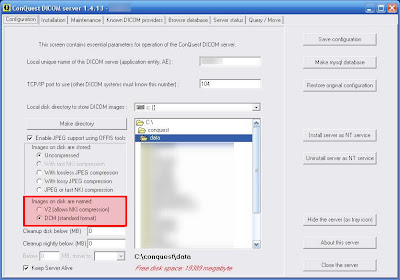 There is a nice new little feature in the GUI interface that allows for the images to be stored as standard DCM as apposed to the V2 file format.
Additional scripting options have also been added, I will report on these as soon as I have had some time to test them all out.
Version 1.4.13 of Conquest server was released on Friday.
Upgrading on Windows:
- Download the latest files from http://www.xs4all.nl/~ingenium/dicom.html
- Stop the conquest service if it is installed and close the conquest server gui interface.
- extract the files in the directory you installed conquest
- let all files and folders get overwritten
- re-start the conquest server service or open the gui interface.
 There is a nice new little feature in the GUI interface that allows for the images to be stored as standard DCM as apposed to the V2 file format.
Additional scripting options have also been added, I will report on these as soon as I have had some time to test them all out.
Saturday, 8 December 2007
Conquest Dicom Server Custom Log File
How to setup your own custom Conquest server log file
I have setup my Conquest server with a logging system that effectively saves information to a CSV file every time images are sent or received by the machine.
I then also wrote a small bat script to archive the log files to prevent the log from becoming to large.
The letters preceded by a % are variables that represent things such as the calling AE title et. You can find a list of these in the help file supplied with conquest.
I noticed that this was effective, but the log file would soon fill up, so I created a bat file that would copy the file to an archive folder so that the log file would not become too large and slow when opening it.
the contents of the bat script to copy and rename the file to an archive location are as follows:
You can copy and paste the above code into notepad and save it as a bat file and run it via the task scheduler.
Hope this helps someone out there.
I have setup my Conquest server with a logging system that effectively saves information to a CSV file every time images are sent or received by the machine.
I then also wrote a small bat script to archive the log files to prevent the log from becoming to large.
- open the dicom.ini file with a text editor like notepad or notepad++.
- At the end of the file add an export converter.
You can do this as follows:ExportConverters = 1
ExportConverter0 = append "%d,%f,%p,%m,%s,%b,%o,%u,%c,%i%n" to c:\conquest\logs\incoming_log.csv
The letters preceded by a % are variables that represent things such as the calling AE title et. You can find a list of these in the help file supplied with conquest.
I noticed that this was effective, but the log file would soon fill up, so I created a bat file that would copy the file to an archive folder so that the log file would not become too large and slow when opening it.
the contents of the bat script to copy and rename the file to an archive location are as follows:
@ECHO OFFThis script then also re-creates a blank log file and adds the column headings in the csv file to make viewing easier.
copy "C:\conquest\logs\incoming_log.csv" "C:\conquest\logs\archive\%Date:~6,4%.%Date:~3,2%.%Date:~0,2% incoming_log.csv"
del "C:\conquest\logs\incoming_log.csv"
echo "Date","File Name","File Path","Modality","Station Name","File base name","SOP Instance","Calling AE","CalledAE","patient ID" > C:\conquest\logs\incoming_log.csv
You can copy and paste the above code into notepad and save it as a bat file and run it via the task scheduler.
Hope this helps someone out there.
Subscribe to:
Posts (Atom)